Sequence String Specification
The document is a formal specification of the sequence strings that PathSeq can parse. It includes suggested behaviour of a PathSeq-compliant library when parsing these strings.
This document uses RFC 2119 keywords to emphasise required and optional behaviour.
PathSeq’s chosen sequence format is a simple, unambiguous format that maximises compatibility across VFX DCCs (Digital Content Creation software).
See also
See [ADR-001] Path Sequence Format for more information about why this format was chosen.
1. Simple Path Sequences
Like in pathlib,
the name of a path sequence is the final component in a path.
/directory/ file.1001-1010#.tar.gz
           ├──────────────────────┤
           │         name         │
           └──────────────────────┘
Unlike a pathlib.Path, a path sequence’s name
represents the name of not one file but of all the files in the sequence.
The name has four components:
The stem
An optional pre-range separator
The ranges
The suffixes
/directory/ file . 1001-1010# .tar.gz
       ┌────┴───┼─┼──────────┼───────┴┐
       │    ┌───┘ └───┐      │        │
       │stem│pre-range│ranges│suffixes│
       ├────┴─────────┴──────┴────────┤
       │             name             │
       └──────────────────────────────┘
Supporting multiple ranges in a sequence requires an additional component: an inter-range separator.
/directory/ file . 1001-1002<UDIM> _ 1001-1010# .tar.gz
   ┌───────┴────┼─┼───────────────┼─┼──────────┼───────┴┐
   │    ┌───────┘ |          ┌────┘ └────┐     │        │
   │stem│pre-range│   range  │inter-range│range│suffixes│
   └────┴─────────┼──────────┴───────────┴─────┼────────┘
                  │           ranges           │
                  └────────────────────────────┘
1.1. Stem
The stem is the name of a path sequence, without the pre-range separator, ranges, and suffixes. A non-empty stem MUST be present in the name of a path sequence.
The stem MUST NOT contain a valid range string, or by definition it would be considered part of the ranges.
The stem MUST NOT end with a “-” or digit,
otherwise there is no clear end to the stem and the start of the ranges.
For example, in file-1.1-5#.tar.gz it is unclear whether the stem and range are
file and -1.1-5# respectively, or file-1 and 1-5#.
Note
Although this ambiguity is removed when a pre-range separator of “_” is included,
ending the stem with a digit is still forbidden
to prevent complexity in an API that implements this format.
For example, if it were possible to rename a path sequence by
removing or changing the pre-range separator, doing that may not be possible unless
the stem is changed first.
1.2. Pre-range Separator
The pre-range separator is a single character that separates the stem from the ranges.
The name of a path sequence MAY contain a single pre-range separator character.
The pre-range separator MUST be one of “.” or “_”.
Tip
Including a pre-range separator as “.” is RECOMMENDED for best compatibility with VFX software.
file.1001-1010#.exr
file.1001-1010#.tar.gz
1.3. Range
The range is a concise representation of the file numbers of each file in the sequence plus a definition of how those numbers are formatted in the resulting file names.
A range MUST be present in the name of a path sequence. A range consists of the ranges specifier, and the padding.
 1001-1010,1020-1030 ####
├───────────────────┼────┴──┐
│      ranges       │padding│
└───────────────────┴───────┘
1.3.1. Ranges Specifier
The ranges specifier is a concise representation of the file numbers of each file in the sequence.
The ranges specifier is OPTIONAL. When no ranges specifier is present, the path sequence is considered empty.
A ranges specifier consists of comma separated range specifiers,
where each range specifier is of the format START-ENDxSTEP.
START is REQUIRED, and END and xSTEP are OPTIONAL.
START is the first value in the range,
END is the last value in the range (in other words, END is inclusive),
and STEP represents the difference between numbers in the range.
When STEP is not present, it defaults to 1.
More formally, a range specifier represents a finite Arithmetic Progression.
So the range specifier “1-5” represents the numbers 1, 2, 3, 4, 5.
The range specifier “1-5x2” represents the numbers 1, 3, 5.
1.3.2. Padding
The padding string is definition of how a file number is formatted in each file name contained in the sequence.
The padding is a REQUIRED part of the ranges.
A pad string represents how the numbers in the range should be formatted when putting a number from the range into a file path.
A pad string can be a string of “#” characters, or a MaterialX token.
1.3.2.1. # characters
The most basic form of a pad string is a string of “#” characters.
The number of “#” represents the minimum width of the formatted number.
If the stringified number is smaller than the width,
then it will be zero padded.
If the stringified number is larger than the width,
it will exceed the given width.
A “-” sign, to indicate a negative number, is counted in the width.
Frame range string |
Formats to |
|
|
|
|
|
|
Note
Some DCCs support the use of the “@” character as a single digit pad string. PathSeq does not support this character because it has conflicting definitions between DCCs. Users are encouraged to preprocess “@” characters out of sequence strings passed to PathSeq if this character may be present as a pad character.
1.3.2.2. MaterialX tokens
Pad strings can also use MaterialX tokens (https://materialx.org/Specification.html). The “Filename Substitutions” section of the specification describes two tokens for representing UDIMs in file names.
<UDIM>: This is equivalent to####.Using
<UDIM>can be useful to indicate which ranges in an animated texture sequence are the UDIMs and which are the frame numbers. As an example,texture.1001-1010<UDIM>_1001-1010####.texis clearer thantexture.1001-1010####_1001-1010####.tex.<UVTILE>: This token represents the string “\(\text{u}U\text{_v}V\)”, where \(U\) is \(1+\) the integer portion of the u coordinate, and \(V\) is \(1+\) the integer portion of the v coordinate.
Frame range string |
Formats to |
|
|
|
|
|
|
|
|
|
|
Tip
Using <UDIM> is RECOMMENDED over <UVTILE> for best compatibility across VFX software.
1.4. Inter-range Separator
An inter-range separator separates one range from another in a multi-range path sequence. A non-empty inter-range separator MUST exist between each range.
An inter-range separator MUST NOT be a single “.” character,
so that it is clear when there are two ranges in the resulting file paths
rather than a single range with subframes.
# Good
file.1011-1019<UDIM>_1-5#.tar.gz  # file.1011_1.tar.gz
file.1011-1019<UDIM>_1-5x0.5#.#.tar.gz  # file.1011_1.5.tar.gz

# Bad
file.1011-1019<UDIM>.1-5#.tar.gz
# In file.1011.5.tar.gz, it is unclear if there's numbers from two ranges (1001 and 5),
# or a single subframe (1011.5).
file.1011-1019<UDIM>1-5#.tar.gz
# In file.10115.tar.gz, it looks like there is only a single frame number.
Tip
Using _ as an inter-range separator is recommended for best
compatibility with VFX software.
For the same reason, it is recommended to place the frame number after UDIMs
for animated texture sequences.
file.1-5#_1001-1010#.vdb
file.1001-1005<UDIM>_1001-1010#.exr
An inter-range separator MUST NOT contain a valid range string, or by definition it would itself be part of the ranges.
An inter-range separator MUST NOT end with a “-” or digit,
otherwise there is no clear end to the separator and the start of the next range.
Similarly, an inter-range separator MUST NOT start with a digit,
or a “.” and digits,
otherwise there is no clear end of the previous range and start to the separator.
1.5. Suffixes
Suffixes MUST be present in the name of the sequence.
The file suffixes represent the file extension of the files in the path sequence.
The suffixes include the leading “.”.
The suffixes MUST NOT contain a valid range string, or by definition they would be part of the ranges.
The suffixes MUST NOT start with a “.” and digits
otherwise there is no clear end of the previous range and start to the suffixes.
1.6. Order
A path sequence is ordered and unsorted.
In other words, the order of paths in the sequence is determined by
the given order of the numbers in the ranges.
For example, the sequence string “file.3,4,1,2#.exr” represents the file paths
file.3.exr, file.4.exr, file.1.exr, and file.2.exr in that order.
1.7. Parsing
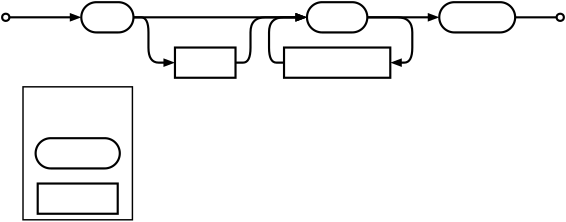
File sequences are parsed by a two step process consisting of tokenisation and parsing those tokens with a Deterministic Finite State Machine. That state machine is as follows:
1.8. Range Grammar
Ranges are simple enough to form an unambiguous Context Free Grammar.
ranges   ::= range ("," range)*
range    ::= FILE_NUM ["-" FILE_NUM ["x" NUM]]
FILE_NUM ::= "-"? NUM
NUM      ::= (0|[1-9][0-9]*)
             (\.0|\.[0-9]*[1-9])?
2. Loose Path Sequences
The PathSeq API has the concept of a “loose” format. Whereas the simple sequence string format maximises simplicity and compatibility across VFX software, the loose format prioritises compatibility in parsing more sequence strings. This compatibility comes at a cost of complexity, and a loose sequence string is less likely to be cross-compatible between VFX software.
The loose format is a flexible format that is useful when parsing sequence strings from unknown sources. It can parse the most sequence strings, but those strings may only work for one DCC. This format can be useful when there isn’t a guarantee that the sequence string being parsed is in the simple format.
In Simple Path Sequences we saw that in the simple format, a sequence’s name has five components: the stem, an optional pre-range separator, the ranges, inter-range strings, and the suffixes. The loose format has an additional component — the OPTIONAL post-range separator — to support additional characters after the ranges but before the next component.
/directory/ file . 1001-1002<UDIM> _ 1001-1010# _final .tar.gz
   ┌───────┴────┼─┼───────────────┼─┼──────────┼──────┼───────┴────┐
   │    ┌───────┘ │          ┌────┘ └────┐     │      └───┐        │
   │stem│pre-range│   range  │inter-range│range│post-range│suffixes│
   └────┴─────────┼──────────┴───────────┴─────┼──────────┴────────┘
                  │           ranges           │
                  └────────────────────────────┘
In addition, ranges can be placed anywhere in a loose sequence string. The placement of the ranges in the strings creates three varieties of loose sequence strings, based on where the ranges are placed.
The ranges can be at the start of the name:
/directory/ 1001-1002<UDIM> _ 1001-1010# _ filename .tar.gz
           ├───────────────┼─┼──────────┼─┼────────┼───────┴────┐
           │          ┌────┘ └────┐     │ └───────┐└───┐        │
           │   range  │inter-range│range│postrange│stem│suffixes│
           ├──────────┴───────────┴─────┼─────────┴────┴────────┘
           │           ranges           │
           └────────────────────────────┘
The ranges can be inside the name:
/directory/ file . 1001-1002<UDIM> _ 1001-1010# _final .tar.gz
   ┌───────┴────┼─┼───────────────┼─┼──────────┼──────┼───────┴────┐
   │    ┌───────┘ │          ┌────┘ └────┐     │      └───┐        │
   │stem│pre-range│   range  │inter-range│range│post-range│suffixes│
   └────┴─────────┼──────────┴───────────┴─────┼──────────┴────────┘
                  │           ranges           │
                  └────────────────────────────┘
Finally, the ranges can be at the end of the name:
/directory/ file .tar.gz . 1001-1002<UDIM> _ 1001-1010#
  ┌────────┴────┼───────┼─┼───────────────┼─┼──────────┤
  │    ┌────────┘┌──────┘ │          ┌────┘ └────┐     │
  │stem│suffixes │prerange│   range  │inter-range│range│
  └────┴─────────┴────────┼──────────┴───────────┴─────┤
                          │           ranges           │
                          └────────────────────────────┘
Warning
Because the stem or suffix are allowed to be empty, the loose format is ambiguous.
For example, #.tar.gz could be represented as a sequence where
the range starts the string and has a blank stem,
or the range is in the string and has a blank stem.
Implementations of PathSeq do not need to provide consistent behaviour when parsing ambiguous loose format strings.
2.1. Stem
The stem is the name of a path sequence, without the pre-range separator, ranges, post-range separator, and suffixes. A non-empty stem MAY be present in the name of a path sequence.
The stem MUST NOT contain a valid range string, or by definition it would be considered part of the ranges.
The stem MAY start or end with a “-”, or digit, or “.” and digits,
but this is NOT RECOMMENDED because it creates abiguity when parsing
a file in the sequence.
Note
Path sequences that represent a sequence of hidden files (files starting with a .)
are interpreted as though the stem starts with “.”.
In this example, where the ranges are in the name, the stem is .:
.1-5#.ext
In this example, where the ranges end the name, the stem is .tar.
.tar.gz1-5#
2.2. Pre-range Separator
Path sequences where the name starts with a range MUST NOT contain a pre-range separator. Path sequences where the ranges exist inside or at the end of the name MAY contain a pre-range separator.
The pre-range separator separates the ranges from the previous component in the name.
If a pre-range separator is present, it MUST be one of “.” or “_”.
2.3. Range
A range MUST be present in the name of a path sequence. It follows the same format as for simple path sequences (see 1.3. Range).
2.4. Inter-range Separator
An inter-range separator separates one range from another in a multi-range path sequence. A non-empty inter-range separator MAY exist between each range. Omitting the inter-range separator is NOT RECOMMENDED in multi-range sequences because it creates abiguity when parsing a file in the sequence.
An inter-range separator MUST NOT contain a valid range string, or by definition it would itself be part of the ranges.
An inter-range separator MAY end with a “-” or digit,
but this is NOT RECOMMENDED because it creates abiguity when parsing
a file in the sequence.
Similarly, an inter-range separator MAY start with a digit,
or a “.” and digits,
but this is NOT RECOMMENDED either because it creates abiguity when parsing
a file in the sequence.
2.5. Post-range Separator
The post-range separator separates the ranges from the next component of the sequence’s name.
The rules that define what is a valid post-range separator, depend on the type of path sequence.
In path sequences where the ranges start the name:
The sequence MAY contain a post-range separator.
If present, the post-range separator MUST be a “
_”, or it would be part of the stem. If it contained a “.” then by definition it would be part of the suffixes.
In path sequences where the ranges exist inside of the name:
The sequence MAY contain a post-range separator.
The post-range separator can be of any length.
The post-range separator MUST NOT contain a “
.”, or by definition it would be part of the suffixes.The post-range separator MAY start with digits, but this is NOT RECOMMENDED because it makes it difficult to tell where the range starts and ends from a file path in the sequence.
In path sequences where the name ends with a range:
A post-range separator CANNOT be present, otherwise the ranges would exist inside of the name.
2.6. Suffixes
The file suffixes represent the file extension of the files in the path sequence.
Suffixes MAY be present in the name of the sequence.
The suffixes include the leading “.”.
The suffixes MUST NOT contain a valid range string, or by definition they would be part of the ranges.
In path sequences where the ranges exist inside of the name:
The suffixes MAY start with a digit, or a “
.” and digits, but this is NOT RECOMMENDED because it creates abiguity when parsing a file in the sequence.
In path sequences where the ranges end the name:
The suffixes MAY end with a digit, or a “
.” and digits, but this is NOT RECOMMENDED because it creates abiguity when parsing a file in the sequence.
2.7. Parsing
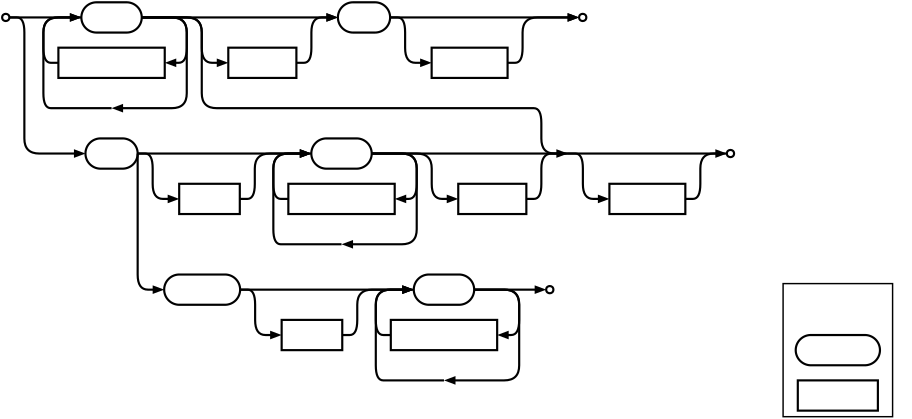
Like simple file sequences, loose file sequences are parsed by a two step process consisting of tokenisation and parsing those tokens with a Deterministic Finite State Machine. That state machine is as follows: