[ADR-001] Path Sequence Format
Accepted
Context
File Sequence Formats in VFX Software
The following table summarises the path sequence formats that are supported by various VFX software.
Software |
# length |
@ length |
Ranges can start name |
Ranges can be in name |
Ranges can end name |
Pre-range required |
Notes |
|---|---|---|---|---|---|---|---|
Blender |
1 |
✗ |
✔ [1] |
✔ |
✗ |
N |
|
fileseq |
4 [3] |
1 |
✔ |
✔ |
✔ |
N |
|
Houdini |
✗ |
✗ |
✗ |
✗ |
✗ |
N/A |
|
Katana |
1 |
✗ |
✗ |
✔ |
✗ |
Y |
|
Maya (file texture node) |
Any |
✗ |
✗ |
✔ |
✔ |
Y |
|
Maya (fcheck) |
1 |
1 [5] |
✔ |
✔ |
✔ |
N |
|
Nuke |
1 |
✗ |
? |
✔ |
? |
? |
|
USD (value clip) |
1 |
✗ |
✗ |
✔ |
✗ |
Y |
Notes:
Blender
Source: https://docs.blender.org/manual/en/latest/advanced/command_line/arguments.html#render-options
These file sequences can be used programatically, for example when calling blender via subprocess.
Warning
Blender does not support subframe output.
Input
Blender does not document any use of sequence strings as input.
Output
##_file.extis not accepted on it own.$ blender -b cube_diorama.blend -o ##_render.png -F PNG -x 1 -f 1 ... Error: you must specify a path after '-o / --render-output'.
But
./##_file.extbecomes01_file.ext.file_##.extbecomesfile_01.extfile-####.extbecomesfile-0001.extfile.ext##becomesfile.ext##.ext. So ranges cannot end a sequence.file##.extbecomesfile##.ext.Multi-dimension output is not explicitly supported.
Sequence string |
Output file |
|
|---|---|---|
Ranges starts name |
|
|
Ranges in name |
|
|
Ranges ends name |
|
|
Pre-range required |
|
|
Note
##_file.ext is not accepted on its own.
$ blender -b cube_diorama.blend -o ##_render.png -F PNG -x 1 -f 1
...
Error: you must specify a path after '-o  / --render-output'.
So Blender does not fully support ranges at the start of the sequence.
Note
The following command outputs files as file0001.png.
$ blender -b cube_diorama.blend -o file -F PNG -x 1 -f 1
So Blender seems to “prefer” ranges right before the extension.
fileseq
Source: https://fileseq.readthedocs.io/en/latest/
The open source file sequence library fileseq implements a mode toggle
so that it can support both # as 4 digits of padding
and as a single digit of padding.
In both modes, fileseq allows mixing # with the @ symbol
to represent a single digit of padding.
These file sequences can of course be used programatically because fileseq is a Python library.
fileseq does not support multi-dimension sequences.
Houdini
Source: https://www.sidefx.com/docs/houdini/render/expressions.html
Houdini allows the use of powerful expressions in file path parameters for both reading and writing files.
$Fd, wheredis an optional number of digits.$FFcan be use to represent fractional frame numbers, but is not recommended due to limitations in the representation of floating point numbers. Instead, the following is recommended:pythonexprs("'%.2f'%"+($T*$FPS+1))Plus more complex expressions.
These expressions are unique to Houdini and, unfortunately, the format of the expressions does not overlap with the path formats of other DCCs (Digital Content Creation tools).
The file sequences can be used programatically in Python, for example when setting the attribute on a node via Python.
Katana
Sources:
https://learn.foundry.com/katana/Content/rg/2d_nodes/imagewrite.html
https://learn.foundry.com/katana/Content/ug/viewing_renders/catalog_tab.html
https://learn.foundry.com/katana/content/tg/launch_modes/batch_mode.html
Input
Katana does not document the input sequences that it supports.
Output
Katana does not clearly document the output formats that it supports.
In the case of the Catalog tool, only
file.#.extis supported.In the case of batch mode rendering, “#” is a single character of digits and examples always show the range before the extension.
Multi-dimension output is not explicitly supported.
Maya
File texture node:
Source: https://help.autodesk.com/view/MAYAUL/2022/ENU/?guid=GUID-309A77DA-F5ED-4474-8413-317D7AB241E6
name.#.ext
name.ext.#
name.#
Where # is any number of digits because this node only reads sequences.
fcheck:
Source: https://help.autodesk.com/view/MAYAUL/2022/ENU/?guid=GUID-6379FC90-954B-4530-AB36-998B6F1E0315
fcheck uses slightly different formats when reading and writing.
Reading (# can be using in place of @):
myimage@.ext
myimage.@.ext
@myimage.ext
myimage.@
myimage.ext.@
myimage#.ext
myimage.#.ext
#myimage.ext
Nuke
Sources:
Read: https://learn.foundry.com/nuke/content/reference_guide/image_nodes/read.html
Write: https://learn.foundry.com/nuke/content/reference_guide/image_nodes/write.html
“#” is a single character of digits. “%04d” is printf-style formatting.
USD
Source: https://openusd.org/release/api/_usd__page__value_clips.html#Usd_ValueClips_Metadata
In USD Value Clips, a # represents a single character of digits.
Summary
The convention of a # representing four digits of padding originates from
the now defunct Shake (https://web.archive.org/web/20080303091032/http://manuals.info.apple.com/en/Shake_4_Tutorials.pdf),
and possibly even earlier.
All software (excluding Houdini) supports # as a single digit of padding.
Support for @ is not widespread
UDIM Formats in VFX Software
The MaterialX Specification (https://materialx.org/Specification.html) defines a common format for representing texture sequences. The “Filename Substitutions” section of the specification describes two tokens for representing UDIMs in file names.
<UDIM>: Originating from Mari, this token represents a four digit number that is calculated as follows: \(\text{UDIM} = 1001 + U + V * 10\). \(U\) is the integer portion of the u coordinate, and \(V\) is the integer portion of the v coordinate.<UVTILE>: Originating from Mudbox, this token represents the string “\(\text{u}U\text{_v}V\)”, where \(U\) is \(1+\) the integer portion of the u coordinate, and \(V\) is \(1+\) the integer portion of the v coordinate.
Additionally, the spec uses the {0Nframes} token for frames,
where N is amount of padding.
Many DCCs support these tokens.
However the {0Nframes} syntax is unique to the MaterialX Specification
and does not overlap with the syntax typically used for frame sequences.
The following table summarises the texture sequence formats that are supported by various VFX software.
Software |
|
|
Supports animated UDIMs |
Notes |
|---|---|---|---|---|
Arnold |
✔ |
✗ |
✗ |
|
Blender |
✔ |
✔ |
✗ |
|
Houdini |
✔ |
✔ |
✗ |
|
Mari |
✔ [6] |
✗ |
✔ |
|
Maya |
✔ |
✔ |
✔ |
|
Mudbox |
✗ |
✗ |
||
USD |
✔ |
✗ |
✗ |
Arnold
It is unclear whether texture sequences are ever used programatically in Python.
Blender
It is unclear whether texture sequences are ever used programatically in Python.
Houdini
Source: https://www.sidefx.com/docs/houdini/vex/functions/expand_udim.html
Texture sequences can be used programatically in Python (e.g. when using VEX strings via Python).
Additionally uses:
%(UDIM)d: Same as <UDIM> but with user specified padding%(U)d: The UVTILE style u-coordinate (int(u)+1), with user specified padding%(V)d: The UVTILE style v-coordinate (int(v)+1), with user specified padding%(UVTILE)d: Same as <UVTILE> but with user specified padding
Mari
Source: https://learn.foundry.com/mari/Content/tutorials/tutorial_5/tutorial_exporting_importing.html and https://learn.foundry.com/mari/Content/user_guide/painting_animated_objects/exporting_animated_textures.html
Reads and writes sequences, and does so using $UDIM and $FRAME.
Sequences output by Mari can be represented as <UDIM> is defined.
In addition, in Mari @ can be used as the UDIM number and # as the frame number.
So supporting @ as a pad string for frames would complicate support with Mari,
and using # matches what Mari expects.
There are no documented restrictions on the format of sequences with multiple ranges.
It is unclear whether texture sequences are ever used programatically in Python, because the documentation only talks about sequences in the context for a user manually exporting via a UI.
Maya
Source: https://help.autodesk.com/view/MAYAUL/2022/ENU/?guid=GUID-309A77DA-F5ED-4474-8413-317D7AB241E6
Additionally uses:
u<u>_v<v>: Zero indexed UV tile style u and v coordinate.
Texture sequences can be used programatically in Python, for example when setting the image name attribute on the texture node via Python.
Mudbox
Source: https://help.autodesk.com/view/MBXPRO/ENU/?guid=GUID-2F153C51-BDC0-467B-A4E5-3D7053915FB7
When exporting, only a base name (aka. a stem) is required.
Files are essentially output as though <UVTILE> was specified.
So choosing a format that Mudbox can consume does not seem necessary, and supporting the MaterialX specification will mean the ability to support the paths that Mudbox outputs to.
Texture sequences are not used programatically in Python because Mudbox does not have a Python interpreter. Therefore pathseq need only consider supporting representing the file sequences output by Mudbox.
USD
Source: https://openusd.org/docs/UsdPreviewSurface-Proposal.html#UsdPreviewSurfaceProposal-TextureReader
Texture sequences can be used programatically in Python, for example when setting the file attribute on the USD node via Python.
ZBrush
Source: https://help.autodesk.com/view/MAYAUL/2022/ENU/?guid=GUID-309A77DA-F5ED-4474-8413-317D7AB241E6
Note
No primary source could be found for support this claim.
Supports writing files as u<u>_v<v>, where u and v are zero-indexed.
This conflicts with Mudbox’s method of one-indexing
and thus with the MaterialX specification.
Texture sequences are not used programatically in Python because ZBrush does not have a Python interpreter. Therefore pathseq need only consider supporting representing the file sequences output by ZBrush.
Range Formats in VFX Software
Few software packages require the inclusion of range numbers in a path sequence because the sequence string is used to either read in a file sequence — in which case the range is determined by what exists on disk — or write out a sequence — in which case the range is sourced from elsewhere in the software, such as the number of the frame being rendered out.
fileseq
fileseq’s ranges suport the following bits of syntax:
Standard: 1-10
Comma Delimited: 1-10,10-20
Chunked: 1-100x5
Filled: 1-100y5
Staggered: 1-100:3 (1-100x3, 1-100x2, 1-100)
Negative frame numbers: -10-100
Subframes: 1001-1066x0.25
Subsample frames are stored as a fractional frame number:
>>> import fileseq
>>> list(fileseq.FileSequence("file.1001-1003x0.5#.@.exr", allow_subframes=True))
['file.1001.0.exr', 'file.1001.5.exr', 'file.1002.0.exr', 'file.1002.5.exr', 'file.1003.0.exr']
The final frame in the range is treated as a maximum possible value, as can be seen when using a fractional chunk size that does not divide exactly into the range:
>>> import fileseq
>>> list(fileseq.FileSequence("file.1001-1003x0.3#.@.exr", allow_subframes=True))
['file.1001.0.exr', 'file.1001.3.exr', 'file.1001.6.exr', 'file.1001.9.exr', 'file.1002.2.exr', 'file.1002.5.exr', 'file.1002.8.exr']
Katana
Where <frame range> can take the form of a range (such as 1-5) or a comma separated list (such as 1,2,3,4,5). These can be combined, for instance: 1-3,5, which would render frames 1, 2, 3, and 5.
Supporting Ranges Anywhere in a File Name
As seen from the above tables, many VFX software packages support the range only in the file name, and support for the ranges starting or ending the name varies.
A format that supports the range only in the file name would look like the following:
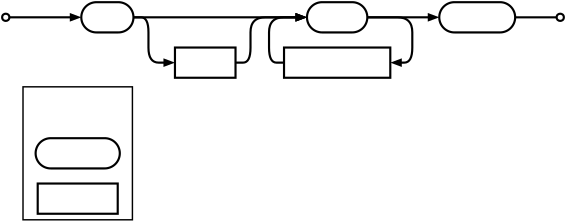
In contrast, a format that supports the range anywhere in the name would look like the following:
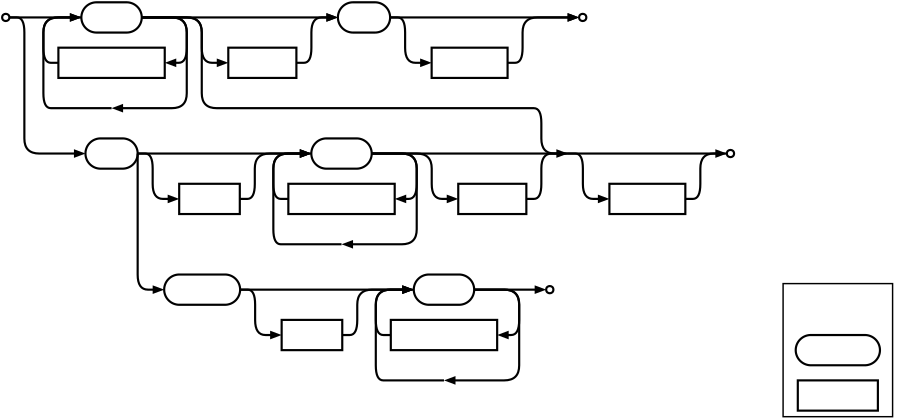
This visual representation highlights the additional complexity that will be required to support parsing such a flexible format. Documenting this format to explain it to users will also be difficult.
Part of the reason this library was created is to encourage the VFX community to conform to a single, easy to understand file sequence format. Thus, simplicity is considered paramount. Particularly when weighed against flexibility of the format.
Considered Options
Options are categorised into three groups:
The number of padding digits that
#represents.1
4
Whether
@is supported in a pad string as a single digit of padding.Yes
No
Whether to support the
<UDIM>token.Yes
No
Whether to support the
<UVTILE>token.Yes - zero-indexed
Yes - one-indexed
No
Where ranges can exist in the name.
The beginning, the middle, or the end. In other words, anywhere.
The beginning, before the suffixes, or the end.
Only before the suffixes.
The format of ranges.
Comma separated chunking with fractional frames: 1001-1066x0.25
fileseq’s complete format.
Decision Outcome
The number of padding digits represented by a # will be one,
as this is what is most widely used today.
@ will not be supported as a pad character because its support is not widespread,
plus it conflicts with Mari’s use of @ as a UDIM token.
<UDIM> will be supported as a token in ranges
because most DCCs support this syntax
and future DCCs that adopt the MaterialX specification will as well.
<UVTILE> will be supported as a token in ranges
because, although support is not as widespread as <UDIM> in DCCs,
it is part of the MaterialX specification.
It will be one-indexed, as this has the most support
and zero-indexing is unique to ZBrush (and Maya’s additional syntax).
Support for ranges existing anywhere other than before the suffix will be supported, because this is essential for pathseq to be adopted. Although increased complexity comes from this more flexible approach, it’s complexity that users already need to be concious of. The pathseq documentation will encourage the usage of the simpler format where possible. If the API needs to be made more complex to support the more flexible approach, there will be “simple” classes and “loose” versions of those classes where the simple classes support the simpler sequence format and the loose versions support the more flexible format. Therefore the loose classes can have a more complex API, which separates the complexity in the implementation and encourages users to want to use the simple format so that they can use the simple API. This separation will also allow a “best-guess” approach to the complex, ambiguous nature of parsing the loose format, whilst the simple classes can have a higher degree of correctness when parsing.
Comma separated chunking with fractional frames will be used as the format of ranges because it maximises functionality, and additional syntax seems to add complexity to the format without prominent use cases that justify this complexity. However, if such use cases come to light in the future then addtional syntax can be added without introducing a breaking change.
Note
The wide range of formats in use across the industry indicates the need for it to be easy to convert between formats. Therefore the AST (Abstract Syntax Tree) of a pathseq object will be made available in the public API so that external code and libraries can make easier substitutions in the sequence to convert it to other formats.
Consequences
Overall, the ability to create a single format that’s compatible with everything is impossible. Many software packages support proprietary tokens, and the formats even conflict between some software packages. Conversion between formats will be necessary, regardless of the format chosen.
The format decided upon maximises compatibility without sacrificing simplicity.
Note
File sequences, cannot be parsed with an unambiguous context free grammar. The fact that strings of arbitrary characters can exist either side of the frame ranges means that a valid file sequence can always be parsed both as a list of arbitrary characters and as a set of ranges surrounded by arbitrary characters.
Considering that it takes \(O(n^3)\) time to parse unambiguous grammars, we will need to take an informal approach to parsing file sequences.